

Blood pressure log
Add your blood pressure and pulse in the morning and evening. The app keeps the history and reminds you to measure.

Blood pressure and pulse
Tap “+” and enter the upper and lower numbers. Add your pulse if the monitor showed it.
Mark the time of day: morning, afternoon, evening or night. The time of the reading fills in by itself.
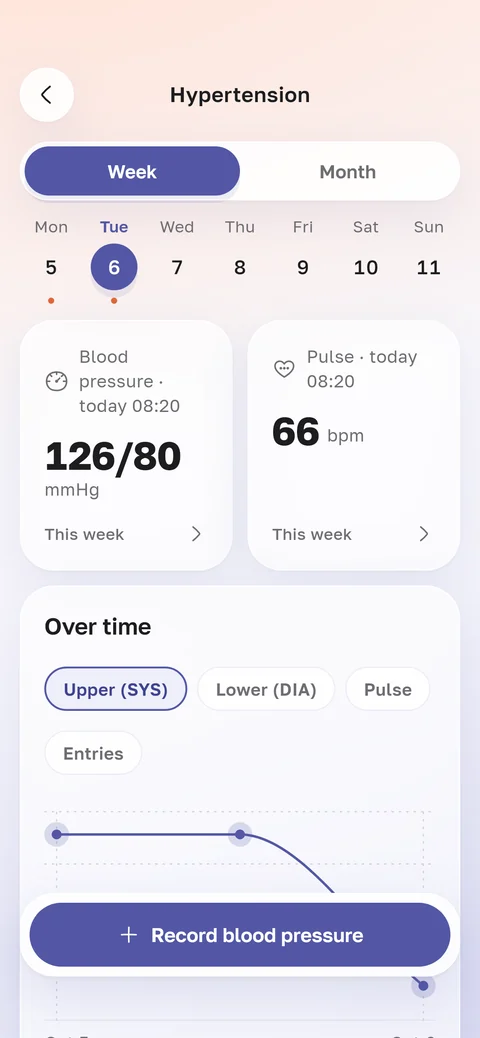
History, chart and reminders
A chart for a week or a month
You can see how your blood pressure changes from day to day. Below are all entries by day.
Reminders at 08:30 and 20:30
You can change the times to suit your day.
Unusual for you
Once you have enough readings, the app marks one that differs a lot from your previous ones.
A log for your mum or dad
If you manage a parent’s profile, choose it in the app and add readings for them. For example, when your mum reads out the numbers over the phone.
The log stays in your parent’s profile, next to their lab results. Reminders come only for your own log.
Large text and a simple form
HemoTrack follows the text size set on your phone. Make the text larger, and the app adjusts.
The reading form has only the blood pressure, pulse and time of day.
How to show your doctor
Open the log at your appointment. The chart shows a week or a month, and below are all readings by day.
Entries don’t get lost like scraps of paper, and there’s nothing to copy out.